

WP Table Builder and RioVizual are two reliable plugins for creating tables in WordPress.
At first glance, they appear similar. Both support common table layouts, drag-and-drop editing, ready-made templates, and a range of built-in elements.
However, the real differences appear when you compare them side by side. Differences in features, flexibility, editing experience, and real-world use cases separate them more than you might expect.
In this WP Table Builder vs RioVizual comparison, we focus on what matters most when choosing between them. We compare features, customization depth, performance, pricing, and long-term usability.
By the end, you will have a clear understanding of which plugin aligns with your workflow, project requirements, and future growth.
Quick Takeaway: WP Table Builder vs RioVizual
Before diving into the detailed comparison, here is a quick overview of how WP Table Builder and RioVizual perform across the key decision factors.
| Criteria | WP Table Builder | RioVizual |
| Number of Elements | 14+ | 19+ |
Supported Table Layouts | Pricing, Comparison, Pros & Cons, Data Table | Pricing, Comparison, Pros & Cons, Schedule, Data Table, Product Table, Post Table |
| Compatibility | Works across the latest WordPress and different page builders | Works across the latest WordPress and different page builders |
| Customization Level | Basic | Extensive (Deeper Styling Control) |
| Central Table Management | Available | Available |
| Gutenberg Block | 1 block (for inserting tables only) | 4 blocks (fully functional for creating and editing tables) |
| Pre-Designed Templates | 28+ total (1 free) | 70+ total (52 free) |
| Schema Markup for SEO | Not available | Available for Pros & Cons tables |
| Right-click Management | N/A | Available |
| Drag and Drop Editing | Available | Available |
| Sticky Row / Column | Available | Available |
| Searching | Available | Available |
| Sorting / Filtering | N/A | Available |
| Pagination | Available | Available |
| Free Version | Available | Available |
| Resource Consumption (WP Hive Benchmark) | +504.73KB | +126.25KB |
| Speed & Performance (GTmetrix Score) | Performance: 86% Page Size: 480KB Page Requests: 20 | Performance: 84% Page Size: 454KB Page Requests: 14 |
| Starting Price | $99/year (unlimited sites) | $49/year (1 site) |
Detailed Overview: WP Table Builder vs RioVizual
1. Elements
Elements define how you present content inside a table. They allow you to combine text, visuals, and actions in a structured layout. The more elements a plugin provides, the easier it becomes to build complete tables without relying on custom code or extra plugins.
| Elements Name | WP Table Builder | RioVizual |
| Text | ✅ | ✅ |
| Image | ✅ | ✅ |
| Button | ✅ | ✅ |
| Advanced Button | ❌ | ✅ |
| Dual Button | ❌ | ✅ |
| Divider | ❌ | ✅ |
| Media & Text | ❌ | ✅ |
| List | ✅ | ✅ |
| Advanced / Styled List | ✅ | ✅ |
| Star Rating | ✅ | ✅ |
| Icon | ✅ | ✅ |
| Progress Bar | ✅ | ❌ |
| Circle Rating | ✅ | ❌ |
Badge | ✅ | ❌(can be recreated with styling) |
| Ribbon | ✅ | ✅ |
| Shortcode | ✅ | ✅ |
| Custom HTML | ❌ | ✅ |
| Title | ❌ | ✅ |
| Price | ❌ | ✅ |
| Features | ❌ | ✅ |
Text Icon | ✅ | ❌ (similar output possible using styled list) |
Winner: RioVizual
Our Takeaway
Choose WP Table Builder if your workflow depends on rating-focused elements like Progress Bar or Circle Rating, or if you need to insert custom HTML directly inside table cells.
Choose RioVizual if you want to build structured tables such as pricing tables, comparison tables, or feature-based layouts without extra setup. Its additional elements, like Advanced Button, Dual Button, Media & Text, Price, Title, and Features, make it easier to create complete, ready-to-use table designs.
2. Supported Table Layouts
Table layouts define the types of tables you can create for different use cases. You may start with a simple table, but as your website grows, you may need comparison tables, pricing tables, or structured data tables. A plugin that supports multiple table layouts helps you manage everything in one place without switching tools.
| Table Type | WP Table Builder | RioVizual |
| Comparison Table | ✅ | ✅ |
| Pricing Table | ✅ | ✅ |
| Data Table | ✅ | ✅ |
| Product Table | ❌ | ✅ |
| Post Table | ❌ | ✅ |
| Pros and Cons | ✅ | ✅ |
| Featured Box | ✅ | ✅ |
| Schedule Table | ✅ | ✅ |
Winner: RioVizual
Our Takeaway
Both WP Table Builder and RioVizual support the most commonly used table layouts, including comparison, pricing, data, and Pros and Cons tables.
However, RioVizual extends its flexibility further with dedicated Product Table and Post Table support. If your website includes product showcases, affiliate content, blog listings, or dynamic content layouts, RioVizual provides broader layout coverage within a single plugin.
3. Compatibility
Compatibility ensures that your table plugin works smoothly with the latest WordPress versions and different page builders. This helps you maintain a consistent workflow and avoid rebuilding tables if you switch the builders in the future.
| Criteria | WP Table Builder | RioVizual |
| Compatible with the Latest WordPress Version | ✅ | ✅ |
| Compatible with different page builders | ✅ | ✅ |
Winner: Tie
Our Takeaway
Both WP Table Builder and RioVizual work well with the latest WordPress versions and different page builders.
If your priority is long-term compatibility and flexibility across different setups, both plugins are equally reliable. You can base your decision on other factors like editing experience, customization, or templates.
4. Customization Level
Customization controls how much freedom you have to design your tables. It helps you match your table layout with your website design, improve readability, and highlight important data. A plugin with deeper customization gives you more control without relying on custom CSS.
| Criteria | WP Table Builder | RioVizual |
| Element-Level Customization | Basic | Extensive |
| Additional CSS | Applies to all tables | Can be applied to specific tables |
Settings Panel | Elements, Settings, Responsive, Device Specific Controls | General, Style, Advanced, Device Specific Controls |
| Insert Image from Link | N/A | Available |
| Image Custom Sizing | N/A | Available |
| Image Lazy Load | Available | N/A |
| Unlink Borders for Custom Values | N/A | Available |
| Switch Between Units (%, px, em, rem) | N/A | Available |
| Content Tag Control (Text Element) | N/A | H1-H6, P, Div |
| Typography Controls | N/A | Available |
| HTML Cell Tag (TH, TD) | N/A | Available |
| Star Rating Color Control | Same color for all stars | Separate colors for filled and unfilled stars |
| Box Shadow | N/A | Available |
| Background Options | Solid color only | Solid and gradient colors |
| Button Style Variations | N/A | Available (Filled and Outline) |
| Cell-Level Styling | Background and border only | Full control (border, shadow, spacing, sizing) |
| Scrollbar and Responsiveness | Available | Available |
| Stacked Table layout | Available | Available |
| Table Caption | Available | Available |
Winner: RioVizual
Our Takeaway
Choose WP Table Builder if you need simple tables with basic styling and minimal setup. It covers essential customization without adding complexity.
Choose RioVizual if you want full control over design and layout. It supports detailed styling at both the element and cell level, making it suitable for complex table structures.
5. Central Table Management
Central table management allows you to create, edit, and reuse tables from a single dashboard. This is important when you use the same table across multiple pages or need to update data frequently. Instead of editing each instance manually, you can update once and apply changes everywhere. This saves time and keeps your data consistent.
| Criteria | WP Table Builder | RioVizual |
| Central Table Management Dashboard | Available | Available |
| Create Once, Reuse Anywhere | Available | Available |
| Apply Updates Globally | Available | Available |
Winner: Tie
Our Takeaway
Both WP Table Builder and RioVizual support centralized table management with reusable tables and global updates.
If your workflow includes updating the same table across multiple pages or managing large volumes of data, both plugins handle this equally well. You can rely on either option for scalable table management.
6. Gutenberg Block
Gutenberg blocks define how easily you can create and manage tables inside the WordPress editor. A fully functional block lets you build and customize tables directly within your page, without switching to an external dashboard. This helps maintain a faster and more consistent editing workflow, especially for content teams working inside Gutenberg.
| Criteria | WP Table Builder | RioVizual |
| Gutenberg Blocks Available | Available | Available |
| Number of Blocks | 1 | 6 |
| Block Names | WP Table Builder | Table Builder, Pricing Table, Data Table, Pros and Cons |
| Functionality | Only for inserting tables | Fully functional for creating and customizing tables |
Winner: RioVizual
Our Takeaway
Choose WP Table Builder if you are comfortable creating tables from the plugin dashboard and only need to insert them into Gutenberg.
Choose RioVizual if you prefer building and editing tables directly inside the Gutenberg editor. It fits better for content workflows where speed and in-editor editing matter.
7. Pre-Designed Templates
Pre-designed templates help you create tables faster without starting from scratch. They are useful when you need to launch pages quickly or maintain consistent layouts across your site. Features like one-click import or copy-paste make the setup process even faster.
| Criteria | WP Table Builder | RioVizual |
| Total Templates Available | 28+ | 70+ |
| Live Copy-Paste | N/A | Available |
| Easy Template Import | Available | Available |
Winner: RioVizual
Our Takeaway
Choose WP Table Builder if you only need a few ready-made templates to get started and prefer building the rest manually.
Choose RioVizual if your workflow depends on speed and variety. Its larger template library and copy-paste workflow help you create different table types quickly while keeping layouts consistent.
8. SEO Schema Markup Support
Schema markup helps search engines understand your table content more clearly. When applied correctly, it can improve how your content appears in search results, especially for comparison-based content like Pros and Cons tables. Built-in schema support removes the need for extra plugins or manual setup.
| Criteria | WP Table Builder | RioVizual |
| Built-in Schema Markup Support | N/A | Available (for Pros and Cons tables) |
Winner: RioVizual
Our Takeaway
Choose WP Table Builder if schema markup is not a priority in your workflow or if you prefer handling SEO enhancements through separate tools.
Choose RioVizual if you publish comparison or affiliate content. Its built-in schema support for Pros and Cons tables helps improve visibility in search results without additional setup.
9. Right-click Management
Right-click functionality helps you access common actions directly from the table interface. Instead of moving to the toolbar for every change, you can edit, duplicate, or adjust elements instantly. This improves editing speed, especially when working with large or complex tables.
| Criteria | WP Table Builder | RioVizual |
| Right-click Functionality | N/A | Available |
Winner: RioVizual
Our Takeaway
Choose WP Table Builder if you are comfortable using the standard toolbar for editing and do not rely on shortcut-based workflows.
Choose RioVizual if you want a faster editing experience. Its right-click options reduce extra steps and help you work more efficiently when managing tables.
10. Drag & Drop Editing
Drag-and-drop editing lets you build tables visually. You can move elements, adjust layouts, and restructure rows and columns directly inside the editor. This makes table creation faster and easier, especially for non-technical users.
| Criteria | WP Table Builder | RioVizual |
| Drag and Drop Editor | Available | Available |
Winner: Tie
Our Takeaway
Both WP Table Builder and RioVizual offer a drag-and-drop editing experience.
If your workflow depends on visual editing without coding, either plugin will work well. You can choose based on other factors like customization, templates, or Gutenberg support.
11. Sticky Rows and Columns
Sticky rows and columns keep important data visible while users scroll through a table. This is useful for large tables where headers or key columns need to stay in view. It helps users follow data more easily and improves overall readability.
| Criteria | WP Table Builder | RioVizual |
| Sticky Column or Row Support | Available | Available |
Winner: Tie
Our Takeaway
Both WP Table Builder and RioVizual support sticky rows and columns.
If you work with large tables and need better readability while scrolling, either plugin will handle this well. You can decide based on other features that impact your workflow.
12. Sorting / Filtering
Sorting and searching help users find and organize data quickly inside a table. Search lets users locate specific values instantly, while sorting allows them to reorder data in ascending or descending order. These features improve usability, especially for large or data-heavy tables.
| Criteria | WP Table Builder | RioVizual |
| Sorting / Filtering | N/A | Available |
| Search Field | Available | Available |
Winner: RioVizual
Our Takeaway
Choose WP Table Builder if search functionality is enough for your tables and you do not need to reorder data.
Choose RioVizual if your tables require sorting or filtering. It is more suitable for data-heavy tables where users need more control to explore and organize information.
13. Pagination
Pagination helps you manage large tables by dividing data into smaller sections. Instead of showing everything at once, users can navigate through pages. This keeps tables compact, improves readability, and reduces long scrolling, especially on mobile devices.
| Criteria | WP Table Builder | RioVizual |
| Pagination for Multi-Step Tables | Available | Available |
Winner: Tie
Our Takeaway
Both WP Table Builder and RioVizual support pagination.
If your tables include large datasets and you want to keep them easy to navigate, either plugin will handle this well. You can choose based on other features that impact your workflow.
14. Free Version
A free version helps you test the plugin before upgrading. It also allows you to build tables without upfront cost. The more features and templates available in the free plan, the easier it is to create useful tables without relying on paid upgrades.
| Criteria | WP Table Builder | RioVizual |
| Free Version Availability | Available | Available |
| Free Elements | 7+ | 10+ |
| Free Pre-Designed Templates | 1+ | 52+ |
| Unlimited Table Creation | Yes | Yes |
Winner: RioVizual
Our Takeaway
Choose WP Table Builder if you only need basic table features in the free version and plan to upgrade for more advanced use.
Choose RioVizual if you want more flexibility without upgrading. Its larger template library and additional elements allow you to build more complete tables using the free plan.
15. Global Styling
Global styling lets you control the entire table design from one place. Instead of styling each element separately, you can apply changes across all elements, rows, columns, and cells at once. This saves time and keeps your table design consistent.
| Criteria | WP Table Builder | RioVizual |
| Global Style for Elements | N/A | Available |
Winner: RioVizual
Our Takeaway
Choose WP Table Builder if you are comfortable applying styles manually to each table or only need basic font-level consistency.
Choose RioVizual if you want faster styling and a consistent design across tables. Its global styling controls reduce repetitive work and make it easier to manage design at scale.
16. Backend Resource Consumption (WP Hive Benchmark)
Backend resource consumption shows how much memory a plugin uses inside the WordPress admin area.
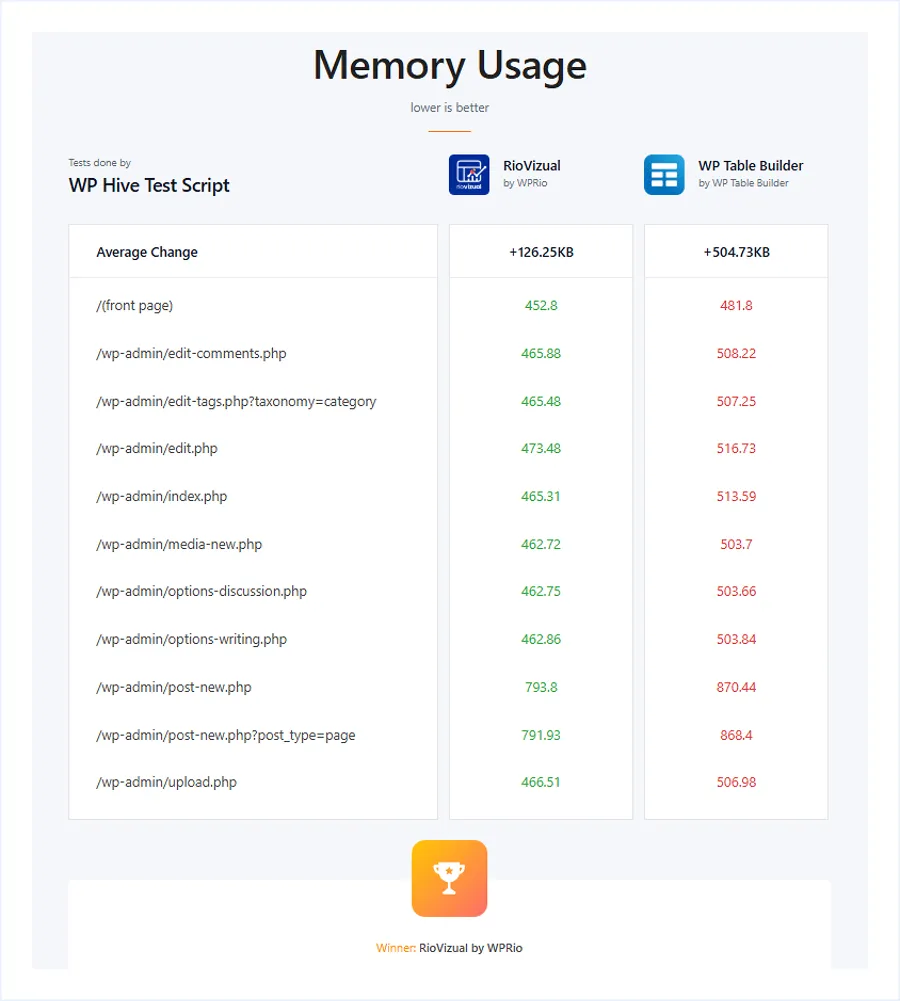
Lower usage helps keep your dashboard fast and responsive, especially when working with large tables, media files, or multiple plugins. It also reduces server load, which is important for performance on shared hosting or content-heavy websites.
| Criteria | WP Table Builder | RioVizual |
| Average Memory Usage (WP Hive) | +515.91 KB | +120.3 KB |
Winner: RioVizual
Our Takeaway
Choose WP Table Builder if backend performance is not a major concern and your site has enough server resources to handle higher memory usage.
Choose RioVizual if you want a lighter plugin that keeps your WordPress dashboard more responsive. It is better suited for content-heavy websites or workflows where you frequently work inside the admin area.
17. Speed & Performance (GTmetrix)
Speed and performance impact how quickly your pages load and how smoothly users can interact with your content. A faster-loading table improves user experience, reduces bounce rates, and helps maintain better performance across content-heavy pages.
| Performance Criteria | WP Table Builder | RioVizual |
| Performance | 86% | 84% |
| Page Size | 480KB | 454KB |
| Page Requests | 20 | 14 |
Winner: RioVizual
Our Takeaway
We tested both plugins by creating the same table using identical elements, rows, and columns under the same conditions. This ensures a fair comparison of their performance.
Both plugins perform well, with only a small difference in performance score.
Choose WP Table Builder if your priority is achieving a slightly higher benchmark score.
Choose RioVizual if you want better real-world efficiency. Its smaller page size and fewer page requests help pages load more smoothly, especially when multiple tables or other elements are used on the same page. This makes it a more practical choice for content-heavy websites.
19. Pricing
Pricing determines how well a plugin fits your budget as your website grows. Flexible pricing helps you choose a plan based on the number of sites you manage, while lifetime options can reduce long-term costs.
| Number of Sites | WP Table Builder(Annual) | WP Table Builder(Lifetime) | RioVizual(Annual) | RioVizual(Lifetime) |
| Single Site | N/A | N/A | $49/year | $149(one-time) |
| 10 Sites | N/A | N/A | $99/year | $199(one-time) |
| Unlimited Sites | $99 /year | $279 (one-time) | $149 /year | $299(one-time) |
Winner: Depends on your choice
Our Takeaway
Choose WP Table Builder if you manage many websites and want a single plan with unlimited usage at a lower yearly cost.
Choose RioVizual if you want flexible pricing. You can start with a single site and scale as needed. Its lifetime plans also make it a better long-term option for ongoing projects.
Final Verdict: WP Table Builder vs RioVizual
After comparing all key features, here is a quick score-based summary:
| Category | Winner |
| Elements | RioVizual |
| Supported Layouts | RioVizual |
| Compatibility | Tie |
| Customization | RioVizual |
| Table Management | Tie |
| Gutenberg Workflow | RioVizual |
| Templates | RioVizual |
| SEO (Schema) | RioVizual |
| Editing Experience | RioVizual |
| Drag & Drop | Tie |
| Sticky Rows/Columns | Tie |
| Sorting & Searching | RioVizual |
| Pagination | Tie |
| Free Version Value | RioVizual |
| Global Styling | RioVizual |
| Backend Performance | RioVizual |
| Frontend Performance | RioVizual |
| Pricing Flexibility | RioVizual |
Overall Score: RioVizual Wins 13 | WP Table Builder Wins 0 | Tie 5
Note: WP Table Builder does not win in individual feature categories but remains a practical choice for specific use cases like unlimited site licensing and rating-focused tables.
FAQs
The Bottom Line
RioVizual is the better choice for most users who want flexibility, faster workflows, and long-term scalability. It works well for marketers, content creators, and websites that need different types of tables with strong design control, Gutenberg editing, templates, and built-in SEO support. If you want a single solution that can handle multiple use cases as your site grows, RioVizual is the better fit.
WP Table Builder is better suited for specific use cases, especially for agencies and freelancers who need unlimited site usage, or for review-style websites that rely on rating elements. If your priority is managing multiple websites under one license with a simple setup, it remains a practical option.
If you want to explore more options beyond these two plugins, you can check our detailed guide on the Best WordPress Table Plugins.

Leave a comment